Docs / Using Mediarium
Indexers & Search
Indexers are the sites Mediarium asks when it looks for releases. You'll find them under Settings > Indexers & Search. There are three kinds, and you can mix them. Every search goes to all enabled indexers at once, and the results come back as one list.
| Kind | What it is | You need |
|---|---|---|
| Newznab (Usenet) | The API almost every Usenet indexer offers. Results are NZB files, downloaded by the built-in Usenet client. | The indexer's address and your API key, plus a Usenet provider account (Settings > Downloading > Usenet). |
| Torznab (torrents) | The same API for torrent sites, offered by some trackers and by Prowlarr or Jackett if you already run them. | The Torznab address and API key. |
| Sites from the definition list (torrents) | Torrent sites without an API, driven by a community-maintained definition that describes how to search the site and read its pages. Prowlarr and Jackett use the same approach ("Cardigann"). It's built into Mediarium, so you don't need an extra container. | Nothing for public sites. Your login or browser cookie for private ones. |
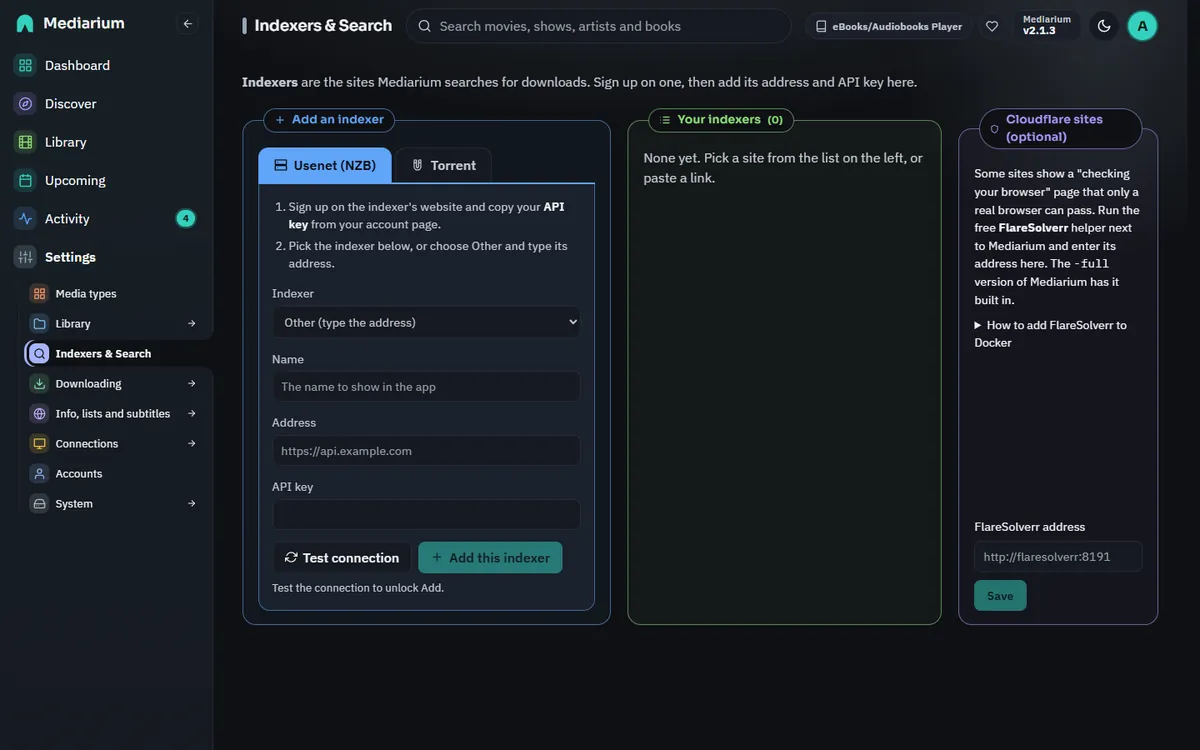
Settings > Indexers & Search: add an indexer on the left, your indexers in the middle (with Test, Edit, Disable and Remove) and the optional Cloudflare helper (FlareSolverr) card on the right. The addresses shown are examples.
Searching for a release by name
Search > Search your indexers for a release asks every indexer for a release name, the way you would on the indexer's own site (for example "Heat 1995 1080p"). The results list the quality, indexer, size and seeders; blocklisted releases are hidden unless you untick Hide blocklisted releases. Download works out the movie or show from the release name, adds it to your library if it isn't there yet, and downloads it as usual. Scripts: GET /api/search?q=... and POST /api/search/grab.
Priority, health and Test all
Each indexer card has a Priority: Preferred, Normal (the default) or Last resort. Quality always comes first. Between two releases that are equally good, the one from the more preferred indexer is picked, then a Usenet release over a torrent. Scripts: PUT /api/indexers/{id}/priority with {"priority": 1} (1 preferred, 2 normal, 3 last resort).
Under the address, each card says how its last test went ("Last test passed 2 hours ago", or why it failed). Test all above the list tests every enabled indexer, one after another, and says which did not answer.
When an indexer keeps failing
An indexer that is down, blocks you or limits your requests would otherwise slow every search and fill the Health page with the same error. After 3 failures in a row (a site that cannot be reached, an HTTP 5xx error, a Cloudflare page, a refused key) Mediarium leaves it out of searches for a while: 5 minutes first, then 10, 20, 40 and so on, up to 6 hours. An indexer that says you made too many requests is paused at once, for as long as it asks with its Retry-After header (and at least 5 minutes, at most 6 hours).
While an indexer is paused:
- its card says "Paused until 14:20 after 3 failures in a row, because it could not be reached", and has a Try again now button;
- Health lists it as a warning;
- searches skip it without an error, and a release list that you open says which indexer was skipped.
The first answer that works clears the count, and so does Try again now, a Test that passes, or editing the indexer. When a pause ends, the next search asks the indexer again; if that fails too, the next pause is longer. The pauses are kept across restarts. A search that you cancel yourself is never counted as a failure.
Scripts: POST /api/indexers/{id}/resume is Try again now; GET /api/indexers adds failures, pausedUntil, pausedNote and pausedWhy to a paused indexer.
How each indexer is doing
Settings > System > Statistics has an Indexers, last 30 days card (administrators only): for each indexer the number of searches, how many failed, the share that worked, how many releases it returned and how many of its releases were grabbed, by hand or by Mediarium. A search skipped because of a pause is not counted. The counters are kept for 90 days. Script: GET /api/stats/indexers.
Grabbing from IRC announcements
Trackers post every new release in an IRC channel seconds after it is uploaded. The IRC announce card under the indexers (Settings > Indexers & Search) can listen there and download a release you want right away, instead of waiting for the next RSS check. It only ever acts on movies and shows that are already in your library and wanted, with the usual quality rules, and it is off until you add a connection and switch it on. Setup, the templates, the test box and the limits are in IRC announce.
Usenet or torrent?
- Usenet: you pay a Usenet provider for access and use an indexer to find NZBs. Downloads are a direct, encrypted connection to your provider. Nobody else sees what you fetch.
- Torrents: free, but you download from (and upload to) other people. Everyone in a swarm can see your IP address. Mediarium's built-in VPN (Settings > Downloading > VPN and proxy, see VPN protection) can hide it. Torrents can be switched off in Settings, and torrent indexers are then skipped.
Adding a Newznab or Torznab indexer
Under Add an indexer on Settings > Indexers & Search, choose the Usenet (NZB) or Torrent tab. For Usenet, pick your indexer from the list (or Other and type its address) and paste your API key. For a Torznab link, choose Paste a Torznab link on the Torrent tab, then paste the address and the API key. Press Test connection, then Add this indexer (it stays greyed out until the test has passed). The name is required, the address must start with http:// or https:// and name a server, and the API key can't contain spaces or line breaks. Mistakes are pointed out under the field, and the server refuses the same ones from a script.
Indexers from Prowlarr or Jackett: add each one with its own Torznab (or Newznab) feed address, not Prowlarr's main page. In Prowlarr, open the indexer and copy its feed address, which looks like http://192.168.1.10:9696/5/api, and use Prowlarr's API key (Settings > General). An address that gives back a web page instead of a feed is refused with a message saying so. To bring over all of them at once, use Settings > System > Move from other apps (Move from other apps). A few indexers are built into Prowlarr's own code rather than the shared definition list. Mediarium has its own definition for two of them (Toloka and IPTorrents, see below); any other site like that can only be added through Prowlarr's feed address. Prowlarr also stays the fallback for IPTorrents: if the built-in one doesn't work for you, add IPTorrents in Prowlarr and give Mediarium its feed address.
If you added a torrent indexer on the Usenet (NZB) tab by mistake, Mediarium still tells torrents from NZB files by what the feed sends and downloads them as torrents. Still, add torrent sites on the Torrent tab: that's where the seeders, the VPN and the torrent client settings apply to them.
Each saved indexer has Test, Edit, Disable and Remove. Edit changes the name, address and API key, and a blank API key keeps the saved one. A failed test says what went wrong in plain words (address not found, connection refused, no answer in time, certificate problem, wrong API key, IP address not allowed). The key is never sent back to the browser. The indexer list only says whether one is saved (hasApiKey).
Adding a site from the definition list
On the Torrent tab of Settings > Indexers & Search, Pick a site from the list opens a searchable list of sites, which you can narrow with Public, Semi-private and Private. Pick one, fill in what it asks for and press Add (the button carries the site's name). Then press Test on its card in Your indexers. Adding doesn't test it for you.
- The list isn't part of Mediarium. Mediarium ships no list of sites. The first time you open the list, your server downloads the community definitions (one archive from GitHub) and keeps a copy in
/config/indexer-definitions. It refreshes that copy at most once a day when you open the list again, or when you press Update list. You choose which sites, if any, to add. - Built in: Toloka.to. The Ukrainian tracker isn't in the community list (Prowlarr runs it from its own code), so Mediarium brings its own definition for it. It shows in the list like any other site: add your Toloka username and password, and optionally Search freeleech only. Toloka's titles carry the Ukrainian name, the original name and markers such as "Сезон 2, Серії 1-8 з 10"; Mediarium turns these into a normal release name (
Show S2E1-E8 (2023) WEB-DL 1080p) so the right episodes are matched. If the community list ever adds Toloka, its version is used instead. - Built in: IPTorrents (new, needs a tester). IPTorrents isn't in the community list either (Prowlarr and Jackett code it by hand and sign in with a browser cookie). Mediarium brings its own definition, which shows in the list as IPTorrents with a note that it is new. It was written from public descriptions of how the site's pages are laid out and has not been run against the real site yet, so it may need a fix. If you have an account, see Trying the IPTorrents definition below. If it doesn't work for you, use IPTorrents through Prowlarr as before.
- Public sites usually need nothing: pick one and save. Some let you choose sorting or filters.
- Private sites need your account. Depending on the site, the form asks for a username and password (Mediarium signs in for you and signs in again when the site logs it out), an API key or passkey, or the cookie from your browser (for sites whose login has a CAPTCHA). To copy a cookie: sign in to the site in your browser, open the developer tools (F12), reload a page of the site, open the request in the Network tab and copy the whole
Cookierequest header. Some sites also want your browser's User-Agent; when a site has a User-Agent field, Mediarium sends what you type there with every request to that site. When the site signs you out, copy a fresh cookie. - Passwords, cookies, API keys and passkeys are stored encrypted and never sent back to the browser. Edit on a site added from the list only renames it. To change its login or cookie, remove the site and add it again.
- Addresses: sites often have several mirrors. The form lets you choose one of the addresses in the definition, and the first is used unless you pick another.
- Test signs in (if needed), runs a search and reports how many releases came back. If a test fails, the dashboard shows it until a later test passes.
- Mediarium waits between requests to the same site (at least one second, longer if the definition asks, up to ten seconds) and keeps each site's sign-in between searches, so it doesn't hammer sites.
Trying the IPTorrents definition
This definition is new and nobody has run it against the real site yet. If you have an IPTorrents account and a few minutes, please try it. Here is what to do.
1. Set up your profile on IPTorrents. In your profile settings on the site, set Torrents per page to 100, tick the option that shows the files count, and set the category column to icons (not text). Mediarium reads the result table by position and by the category icon links, so with other settings results can come back empty or in the wrong category. Wait a minute or two for the site to apply it.
2. Copy your cookie. Sign in to IPTorrents in your browser. Open the developer tools (F12), go to the Network tab, reload any page of the site, click the first request, and under Request Headers copy the whole value of Cookie. It looks like uid=123456; pass=abcdef.... Also copy the value of User-Agent from the same list. IPTorrents ties the cookie to the browser it was made in, so the two have to match.
Keep the cookie secret. It is your login: anyone who has it can use your account. Mediarium stores it encrypted and never shows it again, but don't paste it into a chat, a forum post or a bug report. When you sign out on the site, or it signs you out, the cookie stops working and you have to copy a fresh one.
3. Add the site. Settings > Indexers & Search > Torrent > Pick a site from the list > IPTorrents. Paste the cookie and the User-Agent. Search freeleech only limits results to freeleech torrents. Sort results by picks the order the site sends them in. If the main address is blocked where you live, the Site address list has mirror addresses of the site; use the one that works in your browser. Press Add, then Test on its card.
4. What you should see. Test signs in with the cookie (it looks for the sign-out link on the front page) and runs a search, then says how many releases came back. A search from Search > Search your indexers for a release should list releases with size, seeders and the right quality in the name, and Download should send a normal torrent to your client. Possible messages:
- the cookie was not accepted: the cookie is wrong, has expired, or was copied with the wrong User-Agent. Copy both again.
- enter the cookie from your browser: the cookie field is empty.
- This site is behind a Cloudflare check: IPTorrents showed a browser check. Set up FlareSolverr (see below) or copy a cookie that includes the Cloudflare part (
cf_clearance). - Test passes but searches find nothing, or sizes, seeders or dates are wrong or missing: the page layout is probably different from what the definition expects. That is what this test is for.
5. What to send back. Please open an issue on GitHub (or send a message) and say what you saw. If something is wrong, include one anonymised result row: in your browser, right-click a result row on the Browse page, choose Inspect, copy the <tr> element's HTML ("Copy outerHTML"), and paste it with these parts removed or replaced: the numbers after uid= and pass= (if they appear), your username, any torrent_pass= value in the download link, and any other personal text. The titles, sizes, seeder numbers and the layout of the cells are what matter. Also say whether the files-count option is on, and which address you used. Never send your cookie.
What the definition expects, for anyone checking it against the site: the search is /t?<category id>=&q=<words> (with free=on for freeleech only and o=<sort>); the results are in a table with the id torrents; the title is the link with class hv; the download link starts with /download.php/; size is the sixth cell; snatches, seeders and leechers are the last three cells; a span with class free marks freeleech torrents; the date is the text after the last | in the sub line, such as "3.2 hours ago". Paging is not used: you get the first page, which is why the profile asks for 100 per page. The categories are mapped to the usual movie, TV, audio, book, PC and console categories; the adult categories are left out.
Adding your own definition file
For a site that isn't in the list, such as an indexer you run yourself that comes with a Cardigann definition file (.yml) for Prowlarr or Jackett, press Add a definition file under the list and pick the file.
- Mediarium checks the file before keeping it: it must be a readable definition of 1 MB at most, with an id made of letters, numbers, dots, dashes and underscores, at least one
httporhttpsaddress underlinks, and nothing the engine can't run. If something is wrong, it says what and keeps nothing. - The file is kept in
/config/indexer-definitions-custom, apart from the downloaded list, so refreshing the list never removes it. It isn't part of a Mediarium backup (that holds the settings database), so keep your own copy of the file: after restoring on a new server, add it again. - It shows in the list on the Torrent tab with an Added by you badge. A Usenet definition shows there too, and is added as a Usenet indexer. Pick it and add it like any other site. Its Site address can be changed to any web address, such as
http://192.168.1.20:8080/for a helper running on another computer at home. - A file with the same id as a site in the community list takes its place, which is handy for trying a fix before the community list has it. Remove your file and the community version is back.
- Definition files you added, above the list, shows your files with a button to remove each. A file can't be removed while an indexer still uses it: remove the indexer first.
- To update a file, add the new version: it replaces the old one, and indexers using it pick up the change on their next search.
Only add files from people you trust. A definition decides which addresses Mediarium contacts and what it sends there, including the login you fill in for that site.
What doesn't work (yet)
A few definitions use things the engine can't run. The list marks them as unsupported and says why. Today that's:
- logins that always show a CAPTCHA (use the cookie option if the site offers it);
- regular expressions with look-ahead or look-behind in the definition's extraction filters (in text clean-up replacements they're skipped, leaving the text unchanged);
- a small number of definitions with invalid selectors.
Sites change their pages. When a site changes before its definition is updated, searches from it fail or come back empty. A date the site writes differently from what its definition expects is read as any common date format instead, so it no longer fails the search. Refreshing the list picks up the fix once the community has made one.
Sites behind a Cloudflare check
Many public sites sit behind Cloudflare, which sometimes shows a "checking your browser" page that only a real web browser can pass. Mediarium can't embed a browser. When a site shows that page you'll see:
This site is behind a Cloudflare check. Set up FlareSolverr (see Settings > Indexers & Search) to use it.
FlareSolverr is a small helper that opens the page in a headless browser and hands back the cookies that let Mediarium in. Only sites that show the check use it. Everything else talks to sites directly.
The simple way is the -full image (ghcr.io/rdborg/mediarium:latest-full). The helper is built in and running, so there's nothing to add or type. Settings > Indexers & Search then shows "Built in and running". An address of your own saved there is used instead. The differences in size and memory are in Install guide. Cloudflare changes its checks now and then, so no site is guaranteed to keep working.
Or add FlareSolverr yourself as a separate container next to Mediarium in your compose file:
services:
  flaresolverr:
    image: ghcr.io/flaresolverr/flaresolverr:latest
    container_name: flaresolverr
    restart: unless-stopped
    environment:
      - LOG_LEVEL=info
      - TZ=Etc/UTC
    # Only needed if Mediarium is not in the same compose file:
    # ports:
    #   - "8191:8191"
Then set its address in the Cloudflare sites (optional) section of Settings > Indexers & Search (stored as flaresolverr.url, flareSolverrUrl in GET/PUT /api/settings): http://flaresolverr:8191 when both are in the same compose file, otherwise http://<host>:8191. With no address set, Cloudflare-protected sites fail with the message above.
Cloudflare's clearance is tied to your IP address and the browser's User-Agent, so FlareSolverr should reach the internet the same way Mediarium does (same host, same VPN or none). The built-in helper of the -full image always does, because it runs in the same container.
Technical: the -full image sets BUNDLED_FLARESOLVERR=1 and runs the helper on 127.0.0.1:8191. GET /api/flaresolverr/status (administrators) reports {bundled, configured, running, version}, and the dashboard shows a warning if the built-in helper stops answering.
Where the definitions come from, and their licence
The definitions are the community-maintained Cardigann YAML files from github.com/Prowlarr/Indexers (the current definitions/v11 folder), many of them synced from Jackett. At the time of writing the Prowlarr/Indexers repository publishes no licence file (GitHub reports none). Jackett is GPL-2.0. Mediarium, which is AGPL-3.0, doesn't include, modify or redistribute these files. Your own server downloads them from GitHub when you open the site list, and reads them as data. The engine that runs them is Mediarium's own code. Credit for the definitions goes to the Prowlarr and Jackett contributors.
Responsible use
Mediarium doesn't include, recommend or endorse any site. You choose which indexers and sites to add, and you're responsible for using them, and what you download through them, in line with the law where you live and the rules of each site. See Legal notes.
For developers
- Engine:
internal/indexers(cardigann*.gofor the engine,definitions.gofor the download and cache,cardigann_selector.gofor the CSS selector subset). Tests use local fixture sites only (internal/indexers/testdata/cardigann). Definitions shipped with Mediarium live ininternal/indexers/builtin(builtin.goadds them to the downloaded list). - To check the engine against a local copy of the real definitions:
MEDIARIUM_CARDIGANN_DEFS=/path/to/definitions/v11 go test ./internal/indexers -run Corpus -v. - API:
GET /api/indexer-definitions?refresh=1,POST /api/indexerswith{definitionId, name, baseUrl?, settings},PUT /api/indexers/{id}with any of{name, baseUrl, apiKey, protocol, enabled, settings}(left out = unchanged; blankapiKeyor secret setting = keep the saved one;protocolonly for Newznab/Torznab),POST /api/indexers/{id}/test. See API routes. - Result download links from definition-based sites look like
mediarium-indexer://<id>?link=.... The grab pipeline resolves them through that indexer's session (login, details page, Cloudflare) when the download starts.
FlareSolverr with the bundled compose file
The compose file in this repository has an optional flaresolverr service. Start it together with Mediarium:
docker compose --profile cloudflare up -d
Then enter http://flaresolverr:8191 under Settings > Indexers & Search. The first request to a protected site can take up to a minute while FlareSolverr passes the check. Later requests reuse its cookies and are fast.