Docs / Using Mediarium
Activity per title, pausing downloads, one download at a time, retries
When a download fails
A failed download stays in the Queue tab with the reason. Why did this happen, and what can I do? under it explains the reason in plain words and lists what to try. For a release that is no longer complete on your Usenet provider (the most common failure), that is: Blocklist & search again to try the next release (automatic searching does this by itself), a quality profile that accepts more qualities so there are more releases to pick from, and a second Usenet provider from a different company. Once the movie or episode has been downloaded another way, its earlier failed tries are removed from the list by themselves.
Requests and Reports
Two more tabs belong to the request portal; see Accounts for how to set it up.
- Requests lists the titles accounts asked for. Admins approve or decline them. Someone who has to ask sees their own requests and, when a limit is set, how many they have left ("3 of 5 requests left this week"). A request for the 4K copy has a 4K tag.
- Reports shows once an admin has switched on problem reports (or you already made one). It lists the problems people reported with a movie or show: the title (a link to its page), what is wrong, who reported it, and the answer once there is one. Admins press Resolve, write an optional comment and the person is told; Reopen takes it back, and the bin removes a report. Everyone else sees only their own.
Import a file by hand
Activity > Import a file by hand (administrators) lists the video files in the downloads folder, biggest first, with what each file's name suggests ("looks like Heat (1995)", the quality). For each one, choose Movie or Episode, pick the title from your library (the best guess is already chosen when the name matches), and for an episode the season and episode number, then press Import. Mediarium names the file and puts it in your library as it does for a download, marks the title as downloaded and tells your media server. The title must already be in your library. A file already at the destination is never overwritten. The copy left in the downloads folder is removed by the daily clean-up. Files smaller than 20 MB (samples, extras) and hidden folders are not listed. Scripts: GET /api/manual-import and POST /api/manual-import with {"path": "...", "movieId": 12} or {"path": "...", "seriesId": 4, "season": 2, "episode": 5} (the path is relative to the downloads folder).
Add a download by hand
Activity > Add a download by hand (administrators) puts an NZB or a torrent you already have into the download line for a title in your library. Use it for a release you got somewhere else, or one an indexer couldn't find.
- Choose Movie or Episode or season, search your library and pick the title. For a show, pick the season and then one episode, or The whole season. The title has to be in your library already; add it first if it isn't.
- Give Mediarium the release in one of these ways:
- A file: an
.nzbor a.torrentfile (up to 32 MB for an NZB, 16 MB for a torrent). - An address or magnet link: the web address of an NZB or.torrentfile (http://orhttps://), or amagnet:link. Mediarium fetches an address once, right away, and keeps the file, so the address (which can hold a key) isn't stored. - Optionally type a release name. Without one, the name comes from the file name, the torrent or the address. The name matters a little: Mediarium reads the quality and the season and episode from it.
- Press Add download.
The download then goes into the download line like one you picked from a search, with the same checks, repair, unpacking and import. It goes before what the automatic searches added.
Mediarium checks the input before it accepts it, and tells you in plain words if something is wrong:
- An NZB has to be a readable NZB with at least one file, and a torrent a readable
.torrentwith at least one file. A web page, a zip file or a file that was cut off is refused. - A magnet link has to contain the torrent's hash.
- The content decides what a file is, not its name.
- Addresses only go to
http://orhttps://places, and never to the addresses cloud servers keep their credentials on (the same rule as for indexer addresses). - If the release name says another season or episode than the one you picked ("S01E02" when you picked episode 1, or a season pack when you picked one episode), nothing is added.
- A release with programs or scripts in its file list (
.exe,.scr,.batand so on) is refused while Reject releases that contain programs or scripts is on. - NZBs need a Usenet provider (Settings > Downloading > Usenet), torrents need the torrent client, a download client or a debrid service to be switched on.
- Like any download you start by hand, it is refused while another download for the same movie or episode is still running.
The files you upload are kept in the uploads folder next to the database (/config/uploads) until the download is gone from the list; the daily clean-up removes the ones nothing refers to any more after a day.
Scripts: POST /api/downloads/manual (administrators), a multipart/form-data form with movieId, or seriesId with season and episode (0 or left out is the whole season; season 0 is the specials), and either a file part or a url field, and optionally name. It answers 202 with {"queueId", "releaseTitle", "protocol", "sizeBytes"}.
The Wanted page
Upcoming > Wanted lists what Mediarium is still looking for (Missing) and what is below the quality you asked for (Upgrades). Episodes of the same show are folded into one line ("12 episodes missing") with Show episodes and Search show. Find a title narrows the list, the first 50 are shown with Show more for the rest, and Search all searches every title in the list now, one after another (one search per movie, one per show). Above 25 titles it asks first, because many indexers allow only so many searches a day.
A title whose release is being held back by a delay profile (see "Wait for a better protocol" in Quality profiles) shows "Waiting for a better protocol until 14:20" here instead of "Waiting for a release".
The series page
A show's seasons start folded, except the one that needs attention (the latest with missing episodes, or else the latest season). The row of season buttons at the top opens a season and jumps to it; a dot marks seasons with missing episodes. Missing episodes only shows just the episodes that have aired and are not downloaded. Open all and Close all do what they say. The facts at the top include the Next episode and the day it airs.
A title's own activity log
Every movie, show and album keeps its own log of what happened to it, newest first. It tells you why a title hasn't downloaded yet, without digging through server logs.
GET /api/movies/{id}/eventsGET /api/series/{id}/eventsandGET /api/music/albums/{id}/events(every account can read them) return a list of at most 200 events, newest first:[{"at": "2026-09-29T08:30:00.000Z", "kind": "searched", "message": "...", "level": "info"}].levelisinfo,warnorerror. A show's log covers all its episodes.
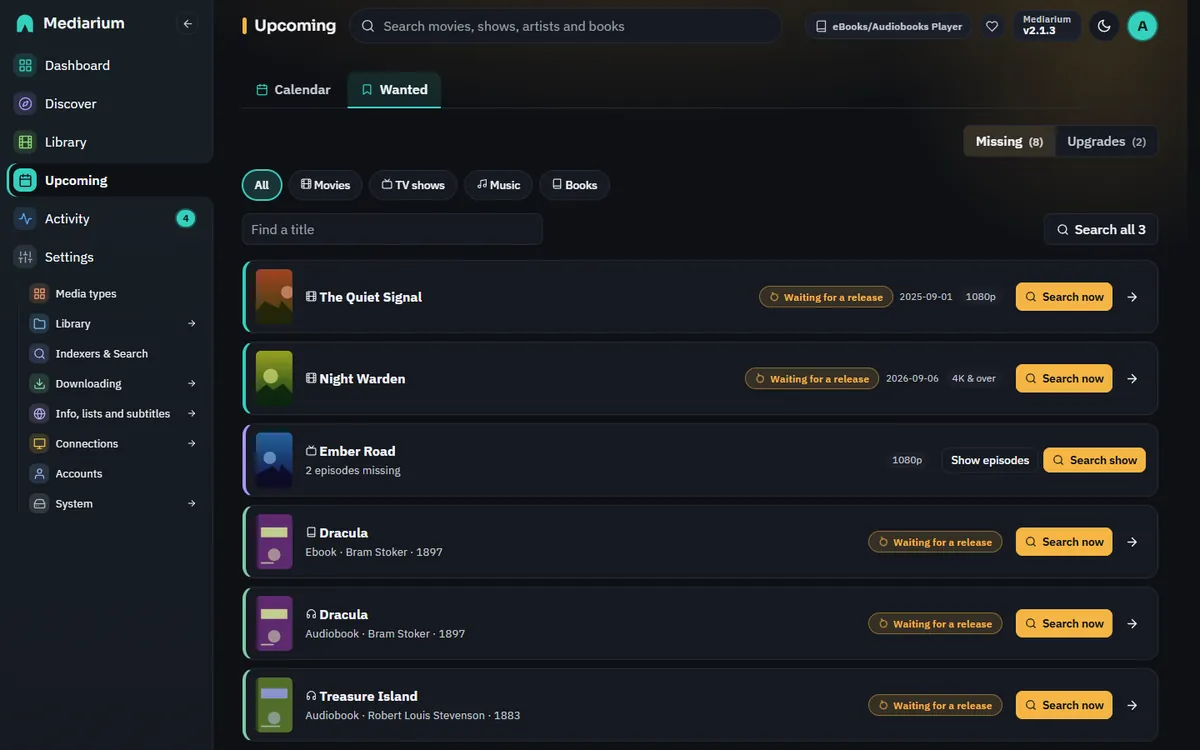
Upcoming > Wanted lists what Mediarium is still looking for. Each row shows the state (Waiting for a release), the release date and quality, and a Search now button. The arrow opens the title and its activity log.
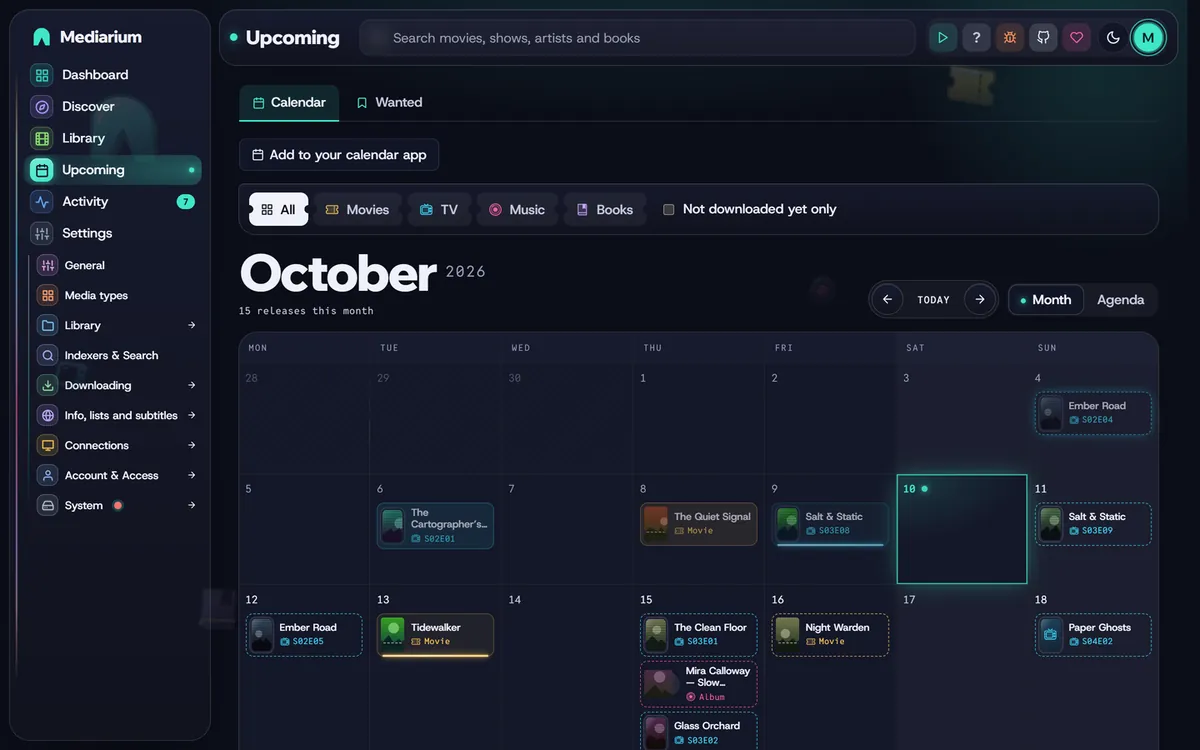
Upcoming > Calendar: releases and episode air dates on their day. The stripe on each entry says whether you have it (green), it's downloading (blue) or it's waiting (yellow). The badge says what it is: a film for a movie, a TV for an episode, a note for an album.
What is recorded (kind):
| kind | when | example |
|---|---|---|
searched |
each automatic search (the scheduled search, Search now, the search after adding a title, the retry after a bad release) | Searched: 12 releases, none acceptable: 8 CAM/TeleSync, 4 other years (warn), or Searched: 5 releases, 2 acceptable; picked "..." from MyIndexer with the "1080p" profile |
grabbed |
a release was queued, by hand or automatically. A grab that only a fallback profile accepted says which profile it used | Grabbed "..." for ... |
download |
the download started, was paused or stopped, and finished (post-processing starts) | Download started: <release> |
postprocess |
PAR2 verify or repair, unpacking, and their failures | Repairing 3 missing articles with PAR2: <release>, Unpacking failed (...): <release> (error) |
imported, failed, conflict |
the end of a download, with the plain reason when it failed. Network and file errors are put in plain words (for example "The address could not be found"). The exact error text is kept in Logs and errors under Technical detail | The Film: Couldn't get the NZB file. The address could not be found. Check the address and your internet connection. (error) |
blocklisted |
a release was blocklisted, automatically (its own fault: corrupt, incomplete, holding programs or scripts) or by you | |
skipped |
a download was left out because the same release was already in the queue or downloaded (see Checks on releases) | Skipped "...": "..." is already in the queue or downloaded. |
retry |
after a blocklisted release, why no other release was taken right away | No other acceptable release; will try again at the next scheduled search (warn) |
retried |
Retry on a failed download, and whether it reused the files already downloaded | Retrying from the files already downloaded: <release> |
removed |
a download was removed from the download list |
A search can skip a release for these reasons: blocklisted, a downloader the title doesn't use (from torrent sites (this title uses Usenet only)), other films (a different movie), other years, for another show, not this episode, not a season pack, a quality no profile in the title's chain accepts (its tier, such as CAM/TeleSync, or unknown quality), excluded by the profile's release terms, in another language, older than your Usenet retention of <n> days, and for upgrade searches not an upgrade over <tier>. Indexers that didn't answer are named too.
A search with the same outcome as a recent one (the scheduled search finding the same releases again) moves that event's time forward instead of adding another. The detailed events (searched, download, postprocess, retry, retried, removed) show only on the title's own log. The global activity feed (GET /api/activity, shown on the History tab) keeps showing grabs, imports, failures, blocklisting and the like. Each title keeps its latest 300 detailed events.
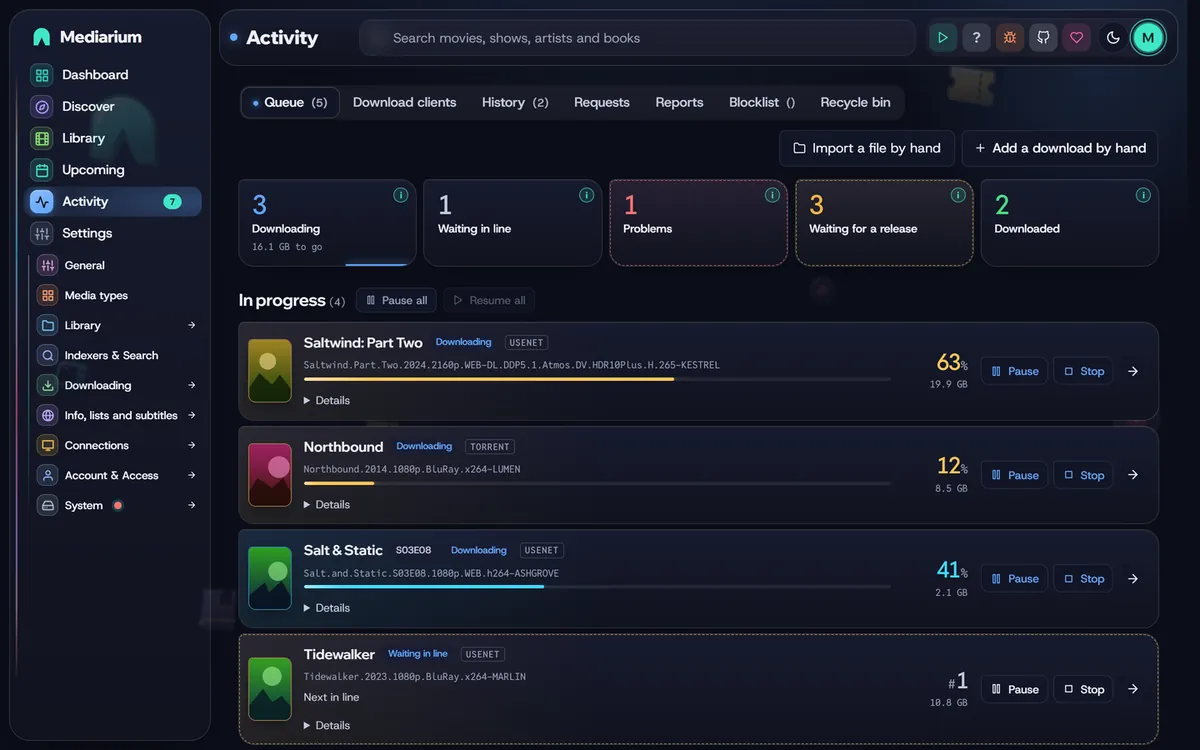
Activity, Queue tab: what's running, waiting in line and paused comes first, then failed downloads, then the titles still waiting for a release. History and Blocklist are the other two tabs.
The Queue tab, top to bottom
The Queue tab always reads in the same order, and rows don't move while they download:
- In progress. Downloading and importing first (the one that started first on top), then the downloads waiting in line in the order they'll start, then paused ones. Pause all and Resume all sit at the top of this list.
- Failed. The newest failure first. Each one has Retry, Blocklist & search again (administrators only) and a remove button.
- Needs your decision. A file already exists and you chose to be asked. Administrators pick Overwrite or Skip, and members see "Waiting for an admin". Then Stopped.
- Waiting for a release. Monitored titles with nothing downloaded yet, with what the last search found. Each is a tile with its poster and year; a show is one tile however many of its episodes are missing ("6 episodes waiting"). The search note is cut short on the tile and reads in full when you point at it. A title that's already downloaded never shows up here. It lists the first 20, and a button opens the rest in Upcoming > Wanted.
While a download runs, its row shows the speed and the time left, worked out from how far it got between two refreshes of the page (so it takes a few seconds to appear, and only while the page is open). Details under a row opens the release name, the indexer it came from, the source, the size, when it was added and finished, where it goes, and what happened to it, from the title's own history. GET /api/queue carries indexerName for the indexer.
The queue refreshes every few seconds. Finished downloads are on the History tab, with Clear finished to empty that list. GET /api/queue returns the items in this order.
Download clients
Administrators have a Download clients tab next to Queue. It is the one place to see and control every downloader, the ones built into Mediarium and any you connected, without opening another program.
Built in. At the top, Side by side, Usenet and Torrents choose what to show: both downloaders as two cards next to each other (they stack on a phone or a narrow window), or just one of them. Mediarium remembers the choice on that device. The two cards are the Usenet downloader and the Torrent client. Each says whether it is ready ("needs your provider" for Usenet until you add a provider, "waiting for the VPN" or "off" for torrents), sums up what it is doing (for example "2 downloading · 1 waiting in line · 4.2 GB to go") and lists its own downloads, newest work first. Every download has the same controls as on the Queue tab: Pause, Resume, Stop, Retry, Blocklist & search again and Remove from this list, with its details underneath. Pause all and Resume all in the heading act only on that downloader, so you can hold the torrents and let Usenet carry on, or the other way round. Finished downloads are on the History tab.
Connected clients. Inside the torrent card, under the built-in client, a section for each client you set up under Settings > Downloading > Torrents > Use your own torrent client (qBittorrent, RDT-Client or Decypharr) and for your debrid account (Real-Debrid or TorBox):
- Torrent client: each torrent has its state in words (Downloading, Waiting for peers, Checking the files, Paused, Seeding, Finished, Problem), a progress bar, the speed down and up, the time left, how many seeds and peers are connected and how many the swarm has, the ratio, when it was added and its size. A torrent that has moved no data for 30 minutes says so ("No data for 2 h. It may be dead.").
- Added by Mediarium shows the torrents Mediarium put in the client (its category,
mediariumunless you changed it); Everything in qBittorrent shows all of them, yours too, marked with their own category. - Buttons: Pause and Resume, Check the files again, Remove, keep the files and Remove and delete the files (both ask first). On a torrent Mediarium added, Give up and search again stops that download, puts the release on the blocklist, removes the torrent and its files and looks for another release.
- Debrid: the torrents on the account with their state, progress, speed and seeders, and a button to remove one.
The page refreshes by itself every few seconds. Nothing here changes torrents you didn't ask about.
Scripts (administrators): GET /api/download-client/torrents?scope=mine|all, POST /api/download-client/torrents/{hash}/pause|resume|recheck|remove|remove-files, GET /api/debrid/torrents and POST /api/debrid/torrents/{id}/remove. A client that can't be reached answers 200 with a plain error. POST /api/queue/pause-all and /resume-all take ?protocol=usenet or ?protocol=torrent to act on one built-in downloader only.
Torrents the built-in client runs show the peers and seeds it is connected to in Details on the Queue tab (peers and seeds in GET /api/queue). Administrators also find the controls of that torrent there: download in order, its own speed limits and a list of its files to tick on and off. A torrent filed under a category shows the category name next to the word torrent (category in GET /api/queue). The torrent client card has the options for all torrents and shows whether the router opened its port. All of it is described in Downloads.
History
The History tab lists the newest 100 events. Show older lines loads 200 more each time, and Find in the history narrows it to lines that contain the words you type. A line about a movie, show or album links to its page. Scripts: GET /api/activity?limit=500&q=heat (at most 2000 lines); each line has a link when it is about a title.
The Blocklist tab (administrators) shows the newest 100 blocked releases, newest first, with the total in the tab name. Show more adds 100. Scripts: GET /api/blocklist is still the plain list of everything; with ?limit=100&offset=0 it answers one page as {items, total, limit, offset} (at most 500 per page).
The calendar
Upcoming > Calendar shows releases, episode air dates, album releases and book releases on their day. Chips at the top show only movies, TV, music or books (when more than one is switched on), and Not downloaded yet only hides what you already have.
The arrows next to the month go back and forward a month, and Today comes back to this one. Posters shows the month with a big poster in each day and the name in a frosted bubble over it; a day with more than one release has a +n more button that opens the whole day as a window of posters. Month shows the whole month as a grid, with a small poster for each release (titles show when there's room; point at a poster to read it). Today's square is lit. Agenda lists only the days that have something on, each with its date on a ticket stub and the releases as cards with their poster, episode code and status. Phones and narrow windows always show the agenda. The calendar remembers which view you picked.
Each release is in its kind's colour and frame (a ticket for movies, a TV screen for episodes, a sleeve with its record for albums, a book, or a cover wearing headphones for audiobooks). A solid card means you have it, a bright line along the bottom means it's downloading, and a dashed outline means it's still wanted. A wanted release whose day has passed also glows. The legend under the calendar shows all of this.
Add to your calendar app gives you a private address (an .ics link) to subscribe to in Google Calendar (Other calendars > From URL), on an iPhone (Settings > Calendar > Accounts > Add Subscribed Calendar) or in Outlook. Releases then show up in your own calendar and update by themselves. The address works without signing in, so anyone who has it can see your calendar: keep it to yourself. Make a new address replaces it (the old one stops working) and Turn it off removes it. Each account has its own. The calendar app must be able to reach Mediarium, so for an app on your phone outside your home this needs your reverse proxy. Scripts: GET, POST and DELETE /api/calendar/feed; the feed itself is GET /api/calendar/feed/{token}.ics.
The download line
Downloads run in a line, and only one runs at a time (Usenet and torrents together). Allow up to five under Settings > Downloading > Download rules > Downloads at the same time. See Downloads.
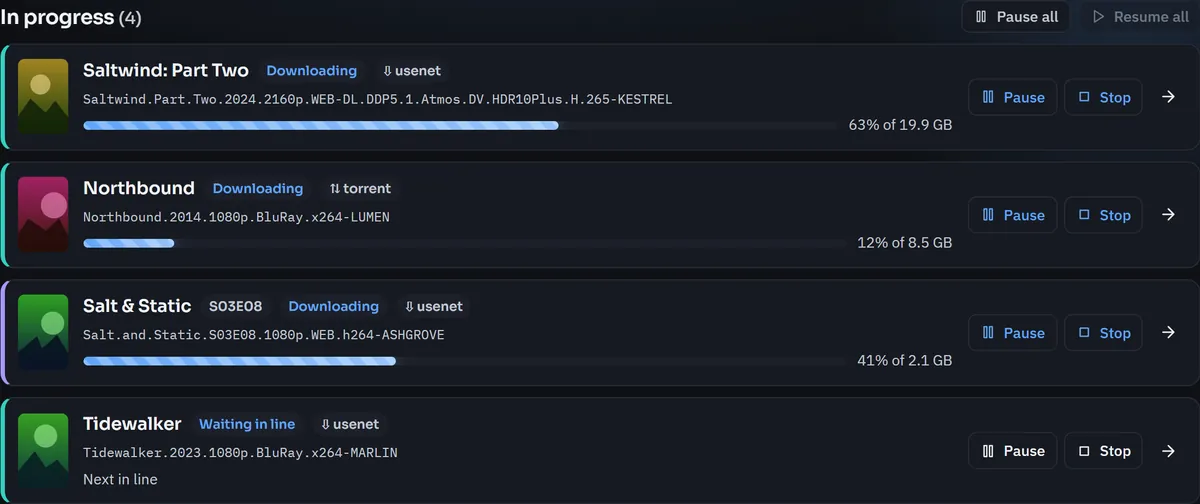
The top of the Queue tab. Every running or waiting download has Pause and Stop. A paused one has Resume.
A download that has to wait shows Waiting in line with its place: Next in line, 2nd in line, 3rd in line and so on. The place is the order downloads will start in, so it changes as things ahead of it finish:
- What you started yourself (Choose release, Search now, adding a title with a search, a bulk search, Retry) goes before what the automatic searches added. Inside each group it's first come, first served.
- A download keeps its place from the first byte until the file is repaired, unpacked and moved into your library. Then the next one starts. If it fails, it stays in Failed for you to retry, and the next one starts anyway.
- A torrent that's only seeding doesn't hold a place.
- Pause and Stop work on a waiting download too. A paused or stopped one is out of the line, and Resume puts it back at the front of its group. Pause all and Resume all keep the order.
- A waiting download can't be removed until you stop it.
Pause, resume and stop
Every download in progress, Usenet or torrent, has Pause and Stop. Only administrators can use them (members can still retry).
| Button | What it does |
|---|---|
| Pause | Stops the transfer at once and keeps the download in the list as Paused. The part already downloaded stays in the downloads folder, and the movie or episode stays reserved, so nothing else is grabbed for it. |
| Resume | Carries on from what is saved. A Usenet download asks the news server only for the articles it doesn't have yet. A torrent is added to the torrent engine again and checks the pieces already on disk. |
| Stop | Cancels the download. The movie or episode goes back to waiting for a release. A question asks whether to also delete the partly downloaded files (ticked). Only the download's own folder inside the downloads folder is deleted, never anything in your movie, TV or music folders. |
| Retry | On a failed or stopped download: tries the same release again. If its files are still there (a partial download too), it carries on from them. |
| Remove | Takes a completed, failed, stopped or paused download off the list. Removing a paused one stops it first, and asks whether to delete its partial files. |
| Pause all / Resume all | Do the same for every download at once. |
A download that's unpacking or importing pauses or stops when the current step ends. The row says Pausing… or Stopping… until then.
After a restart
A paused download is still paused after Mediarium restarts, whatever the mode. That includes safe mode (MEDIARIUM_PAUSE_AUTOMATION).
A download that was only waiting in line is still waiting after a restart, in the same order, and starts about a minute after Mediarium starts when a place is free. In safe mode it comes back paused instead, because safe mode starts nothing by itself.
A download that was running when Mediarium stopped (an update, a crash, the NAS switching off) comes back as Partly downloaded, stopped, with the saved part kept. Press Resume to carry on, Stop to give up, or the remove button.
At every start Mediarium also fixes titles that got stuck. A movie, episode or album marked "downloading" with no download behind it goes back to downloaded (if its file is there) or missing. A movie or episode marked missing whose file is on disk is marked downloaded. A waiting download for a title that's downloaded and set to Leave what I have alone is removed.
Turning off better versions
Setting a title to Leave what I have alone, or stopping monitoring it, removes its downloads that are only waiting (in line, or partly downloaded and stopped by a restart), together with their partial files. A download you paused yourself, or one that's downloading, is left alone. The Library page can do the same for many titles at once: see What you can do to the selection.
Routes
All administrator-only: POST /api/queue/{id}/pause, POST /api/queue/{id}/resume, POST /api/queue/{id}/stop (body {"deleteFiles": true}), POST /api/queue/pause-all, POST /api/queue/resume-all, and DELETE /api/queue/{id}?deleteFiles=1. The full list is in the API reference.
In GET /api/queue, status can also be paused or stopped, and queued means waiting in line: such an item carries queuePosition (1 is next). A paused item may carry interrupted: true (nobody paused it), pending (pausing or stopping while it winds down) and keptFiles.
One download per title
A movie, or an episode, never has two downloads running at once:
- Automatic searches skip a movie or episode that's already waiting in line, downloading, being post-processed or paused.
- A grab by hand (from a title's release list, the search page, or Retry) is refused with
409and the messageAlready downloading: <release>. Cancel it first to pick another.For a paused download the message says to resume it or stop it first. - A season pack covers every episode of its season. While a pack is downloading, you can't grab a single episode of that season or another pack of the same season.
Retry without downloading again
Retry on a failed or stopped Usenet download whose files were all downloaded and are still in its working folder (the failure came later: PAR2 repair, unpacking or the import) doesn't download them again. It checks them with PAR2 again and repeats post-processing (repair, unpack, import). Only when the files are gone, or fail the PAR2 check, is the release downloaded again.
If only part of a Usenet download was saved (it was paused, stopped or cut off), the working folder holds a small file, .mediarium-progress, listing the articles already saved. Resume and Retry fetch only the rest. A torrent that's retried starts again. A torrent that's resumed checks the pieces it already has.
When a release turns out to be bad
When an automatic download fails because of the release itself (corrupt or incomplete: PAR2 can't repair it, the archive can't be unpacked, no video file in it, or it holds programs or scripts), the release is blocklisted and Mediarium searches once more for another acceptable release. If there's none, the title's log says No other acceptable release; will try again at the next scheduled search, and the regular search (see Automatic searching) keeps looking. If more than a few releases for the same title failed within a day, the immediate retry is skipped (and the log says so) until the next scheduled search.